
Contents
- Make the accept, revise, or replace decision first
- Protect the subject’s identity anchors
- Treat hands as action data
- Control the crop and background competition
- Make the lighting direction readable
- Read the still for motion cues
- Match the source to one intended action
- Worked case: recrop before generation
- Run the final source-image approval pass
A motion prompt cannot repair every weakness in a source image. The still already defines the subject, crop, visible anatomy, lighting, setting, and physical starting position. When those elements conflict with the intended action, more instructions may only add complexity.
This is Swipey AI’s editorial checklist for preparing non-explicit Adults 18+ image-to-video projects. Swipey AI is a written resource to keep beside an image-to-video tool; it does not operate an upload or generation service. The checklist complements the guide to writing a motion prompt by addressing an earlier decision: whether the still contains the visual information the planned shot needs.
Make the accept, revise, or replace decision first
Inspect the entire frame before concentrating on small defects. A usable source should have:
- One immediately readable adult subject
- An intentional crop that does not accidentally cut through important joints
- Clear visibility of every body area involved in the action
- A face large enough for the intended expression
- Coherent highlights and shadows
- Open space in the direction of movement
- A pose that can plausibly develop into the requested action
Reject obvious technical faults early. Runway’s image-to-video guide notes that blur and low resolution in a source photograph can carry into the generated clip. A soft face, motion-blurred hand, or heavily compressed clothing edge should therefore be treated as source information—not as a defect the video stage will necessarily remove.
Use one of three decisions:
| Decision | What it means | Next step |
|---|---|---|
| Go | Subject, crop, pose, and environment support the action | Continue to prompt planning |
| Revise | One identifiable problem can be corrected locally | Recrop, simplify the background, adjust tone, or reduce the action |
| Replace | Essential identity detail, anatomy, or a plausible starting pose is missing | Choose another source image |
Protect the subject’s identity anchors
Identity is communicated by a combination of features: unobstructed eyes, facial contour, hairstyle silhouette, wardrobe boundaries, and distinctive accessories. Inspect whether those features agree and remain separated from the surroundings.
A dark hairstyle against a dark wall can erase the outer shape of the head. Tinted glasses may conceal the eyes when the shot depends on a change in gaze. A hand across the lower face may be acceptable in a still portrait, yet provide a poor starting position for a shot that also requires a smile, head turn, and hand movement.
Choose framing according to the action rather than an arbitrary face-size percentage:
- Close framing favors a blink, subtle expression, or small head turn but leaves little room for broad movement.
- Medium framing balances facial readability with upper-body gestures.
- Wider framing accommodates stepping or fuller-body movement but devotes fewer pixels to facial identity.
The practical test is whether the eyes, jawline, hair boundary, and important accessories remain readable at the image’s working resolution. Human-centric image-to-video research presented at CVPR 2026 identifies expression changes, substantial movement, and a face occupying only a small portion of the image as difficult conditions for identity preservation (CVPR paper).
Treat hands as action data
Hands define the starting state of actions such as waving, touching hair, adjusting clothing, holding an object, or resting a palm on furniture. If a gesture matters, its starting anatomy should be visible.
Check whether each required hand is sharp and connected to a readable wrist and arm. Look for fingers disappearing into patterned fabric, two hands merging visually, or an object hiding the contact point. A hand cropped at the frame edge may be harmless when it remains inactive; it is a poor foundation when the planned action depends on it.
Object contact needs its own inspection. For a simple lift, the hand and object should begin in a plausible relationship. A tightly crossed arm, hidden hand, and partly obscured object would require the sequence to reveal anatomy, reverse the pose, establish a grip, and then perform the lift. That is not one clean movement even if the prompt describes it with one verb.
When the necessary hand is unavailable, simplify the action or replace the image. Do not assume added wording can supply reliable visual evidence that the opening frame never contained.
Control the crop and background competition
A detailed setting is not automatically a problem. Ambiguity begins when the background competes with the subject’s silhouette or creates another plausible reading of the frame.
Inspect mirrors, reflective panels, patterned upholstery, background figures, furniture edges, and objects touching the body outline. A lamp aligned with an arm can appear attached to it. A reflection beside the face may resemble another person. Fine repeating patterns can make the boundaries of moving clothing harder to follow.
Preserve details that establish the setting, but simplify elements that cross the face, hands, hair, or expected movement path. Leave negative space where the subject will turn, reach, or step.
The intended output format also matters. A portrait source forced into a wide frame may lose a hand, elbow, or movement space even though the original image looked complete. Review the final crop—not only the uncropped file—before approving the source.
Make the lighting direction readable
The image does not need elaborate cinematic lighting, but it should communicate a believable light structure. Trace the key-light direction through the highlights and shadows on the cheeks, nose, neck, hands, and clothing.
Look for conflicts such as a facial highlight suggesting light from frame left while nearby shadows imply the opposite direction. Featureless highlights can remove facial or wardrobe detail. Deep shadows may conceal a hand or merge the torso with furniture.
Prioritize separation over drama. Hair should remain distinct from the wall, hands from similarly colored clothing, and the torso from the background. A local tonal adjustment may be enough when it restores a specific boundary without changing the scene. If several incompatible light sources create contradictory edges, another source image is usually the cleaner starting point.
This inspection concerns information already present in the still. Camera and illumination instructions come later; the separate camera and lighting vocabulary guide covers that prompt-design stage.
Read the still for motion cues
A static frame already suggests what could happen next. Posture, weight distribution, gaze, hair position, fabric direction, and negative space all act as motion cues.
A subject leaning forward with weight over one foot supports a continued step or a small shift in that direction. A seated subject looking slightly off camera may support a gentle head turn. Hair and loose fabric already displaced toward frame right make an immediate reversal toward frame left a less coherent request.
Favor actions that extend the visible pose. Be cautious when a shot would require the system to invent hidden legs, expose an unseen hand, reverse apparent momentum, or reconstruct the subject from a very different viewpoint.
Amazon Nova’s image-based video documentation explains that a starting frame establishes content, framing, and visual style. It also separates simple camera animation from subject-action generation, where the subject, action, and change need to be described. The source and the eventual prompt therefore have different jobs: the still must make the action physically legible before the words describe how it unfolds.
Match the source to one intended action
State the desired action in plain language, then compare it with the visible starting position.
For a head turn, confirm that the face is not already at an extreme angle and that the destination side has space. For a reach, check the shoulder, elbow, hand, target object, and route between them. For a step, inspect the feet, balance, floor contact, and room in the travel direction. For a small wardrobe adjustment, make sure the relevant hand and garment edge are both visible.
Ask three questions:
- Does the action continue the pose already shown?
- Are all required body parts and objects visible?
- Can the transition occur without revealing hidden anatomy or reversing several cues at once?
If the first answer is no, reconsider the action. If the second or third answer is no, revise or replace the image before writing a longer prompt.
Worked case: recrop before generation
Adobe documents a concrete preparation decision in its Kling video-generation workflow. The operation begins after a user selects a first-frame image. The visible constraint is an aspect-ratio mismatch between that keyframe and the intended video format.
The documented adjustment is specific: hover over the first-frame thumbnail to activate the crop control, move the image within the preview, and approve a crop suited to the output frame. The resulting workflow decision is made before generation—the adjusted keyframe becomes the composition from which the video starts.
In practical terms, this crop review prevents a source from being approved merely because its original canvas contains the full subject. Suppose an upper-body action requires the face, both shoulders, and one active hand. If the selected output ratio removes that hand, the uncropped file is not ready. Repositioning the crop may recover the required anatomy while keeping the face readable. If it cannot, the correct outcome is to change the format, simplify the action, or replace the source.
The same Adobe documentation advises using a first frame that is visually compatible with the action described in the prompt. The useful lesson is not that cropping improves every clip. It is that source approval must happen in the actual output frame, with the action-relevant areas still visible.
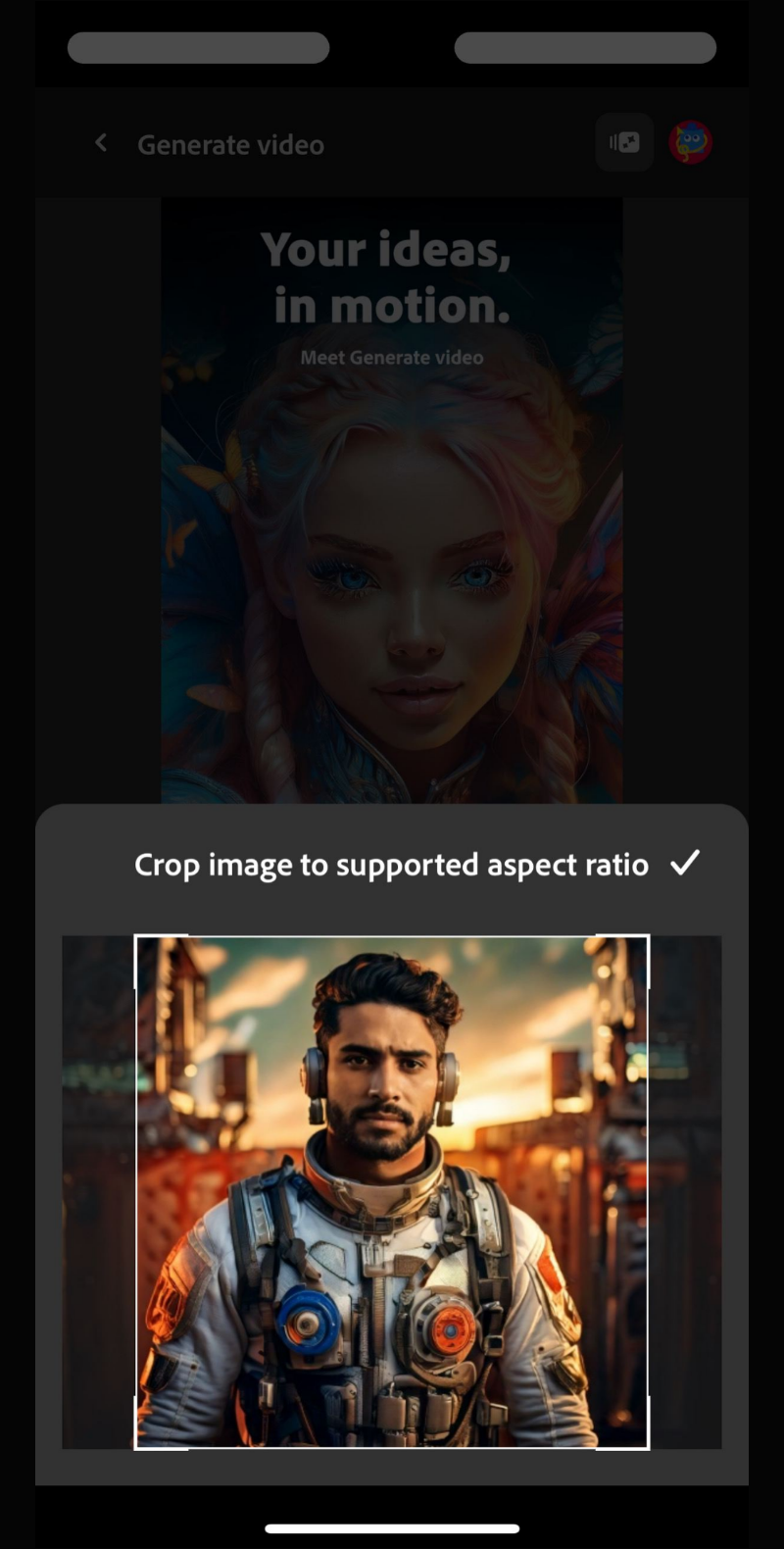
The crop preview lets the user confirm that the face, shoulders, and relevant upper body remain inside the output frame before generation.
Run the final source-image approval pass
Before moving into an Adults 18+ AI video generator workflow, answer these questions in order:
- Is there one unmistakable adult subject?
- Are the eyes, facial contour, hairstyle, and important accessories readable?
- Is the face appropriately sized for the intended expression?
- Are all action-relevant hands, limbs, and objects visible and sharp?
- Does the final crop preserve necessary joints and movement space?
- Do reflections, patterns, objects, or background figures compete with the subject?
- Is one coherent lighting direction readable?
- Does the pose naturally support the requested movement?
- Can the action occur without inventing hidden anatomy or reversing momentum?
- Would one precise edit resolve the remaining conflict?
Choose go when the image and action describe the same physical starting state. Choose revise when a crop, cleanup, tonal correction, or simpler action removes a specific problem. Choose replace when the frame withholds essential information or requires an implausible transition.
A source-first review cannot guarantee a particular generated result. It does make later decisions easier to diagnose: once the opening frame is coherent, prompt revisions can focus on movement instead of trying to repair missing or contradictory visual information.